

 Our mission is to lead innovation by providing the most advanced solutions in reliability and sustainability to empower…
 REC is looking to the future by aligning business goals with Saudi Arabia’s 2030 Vision. Part of this is investing in our young people and their future.
 Reliability Expert Center was established with the strategic vision of spreading a reliability and sustainability culture across Saudi Arabia.




Download Example File for Version 10 (*.rsgz10) or Version 9 (*.rsr9)
This example demonstrates how to perform an initial risk assessment that can be used to determine which components/equipment need a more detailed analysis, followed by an example that uses the FMEA structure to perform a qualitative analysis on a component.
Performing the initial risk assessment allows you to filter out the components/equipment that are of low risk so that you can focus on the higher risk items first. After doing so, you can then do further analysis, either qualitative analysis using the FMEA structure (as described here) or quantitative analysis following API RP 581 (see Example 2).
This example uses the Standard RBI profile that is shipped with the software.
You can use the Risk Discovery analysis feature in RBI to assign ratings for a variety of different factors and then calculate an overall value for each component. If the component passes a threshold value that you determine is appropriate for your needs, you can then mark the item as being in need of further analysis.
For this example, after creating the system hierarchy, you add a Risk Discovery analysis to the pipe and then start assigning the ratings, as shown next.
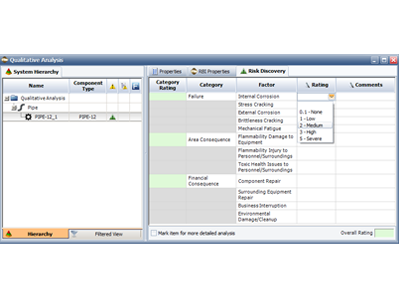
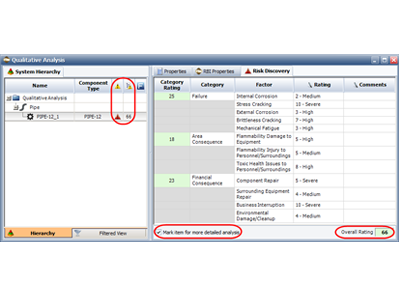
Based on the Overall Rating of 66, you decide that the component requires further analysis; therefore, you select the Mark item for more detailed analysis check box.
Note that you can change the default values to those that better reflect your needs by choosing Project > Management > Configurable Settings > RD Ratings and adjusting the values provided.
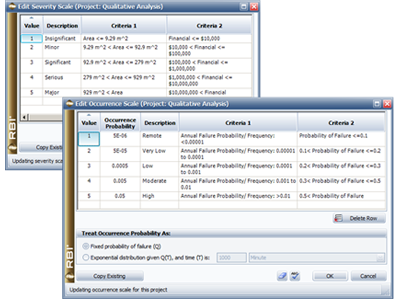
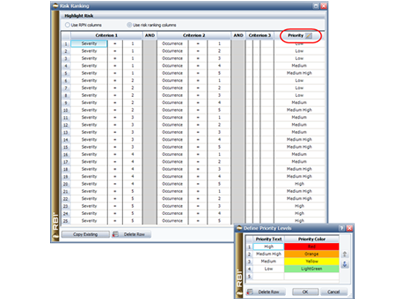

You can quickly perform an initial risk assessment using the risk discovery analysis and you can use the FMEA structure to perform qualitative analysis on items that you do not want to, or cannot, perform a quantitative analysis on.



