

 Our mission is to lead innovation by providing the most advanced solutions in reliability and sustainability to empower…
 REC is looking to the future by aligning business goals with Saudi Arabia’s 2030 Vision. Part of this is investing in our young people and their future.
 Reliability Expert Center was established with the strategic vision of spreading a reliability and sustainability culture across Saudi Arabia.




Download Example File for Version 10 (*.rsgz10) or Version 9 (*.rsr9)
A manufacturer is tracking the failures occurring in a product line. When a failure occurs in a machine, the time of occurrence and the time of repair are recorded for the machine and the parts that failed. Using Weibull++’s event log folio, determine the failure and repair distributions.
The machines operate 8 a.m. to 5 p.m. Monday through Friday. The time of occurrence and time of repair for the machine and parts that failed are shown in the following table.
| Machine | Failure/ Event |
System Failed | System Restored | Part Responsible | |||
| Date | Time | Date | Time | Component | Sub-Component | ||
| 1 | F | 3/1/04 | 11:00 AM | 3/5/04 | 9:00 AM | Electric Saw | Motor |
| 1 | F | 4/1/04 | 2:30 PM | 4/3/04 | 11:00 AM | Conveyer | Belt |
| 1 | E | 5/3/04 | 9:00 AM | 5/6/04 | 12:00 PM | Lubrication | Lubrication |
| 1 | F | 8/3/04 | 3:30 PM | 8/4/04 | 9:00 AM | Electric Saw | Blade |
| 1 | E | 9/1/04 | 4:10 PM | 9/2/04 | 4:00 PM | Inspections | Inspections |
| 1 | F | 12/1/04 | 10:00 AM | 12/2/04 | 3:00 PM | Conveyer | Wheels |
| 1 | F | 1/4/05 | 12:30 PM | 1/7/05 | 7:20 AM | Hydraulic Arm | Hydraulic Lines |
| 1 | F | 2/1/05 | 4:00 PM | 2/2/05 | 7:00 AM | Hydraulic Arm | Piston |
| 1 | F | 3/7/05 | 4:15 PM | 3/9/05 | 9:00 AM | Conveyer | Belt |
| 1 | F | 4/5/05 | 4:30 PM | 4/6/05 | 4:45 AM | Electric Saw | Blade |
| 1 | F | 5/9/05 | 3:00 PM | 5/11/05 | 10:00 AM | Hydraulic Arm | Motor |
| 1 | F | 5/18/05 | 2:00 PM | 5/19/05 | 12:30 PM | Hydraulic Arm | Hydraulic Lines |
| 1 | F | 6/2/05 | 1:00 PM | 6/3/05 | 3:00 AM | Electric Saw | Blade |
| 1 | F | 6/20/05 | 11:00 AM | 6/22/05 | 2:15 AM | Hydraulic Arm | Hydraulic Lines |
| 2 | F | 2/4/04 | 9:00 AM | 2/5/04 | 9:00 AM | Hydraulic Arm | Piston |
| 2 | F | 3/8/04 | 9:00 AM | 3/9/04 | 11:00 AM | Electric Saw | Motor |
| 2 | F | 4/5/04 | 11:00 AM | 4/6/04 | 10:00 AM | Hydraulic Arm | Arm |
| 2 | F | 4/14/04 | 2:00 PM | 4/16/04 | 2:30 AM | Hydraulic Arm | Hydraulic Lines |
| 2 | F | 6/7/04 | 1:00 PM | 6/9/04 | 2:00 AM | Hydraulic Arm | Piston |
| 2 | F | 7/23/04 | 4:15 PM | 7/25/04 | 3:15 AM | Electric Saw | Motor |
| 2 | F | 8/23/04 | 3:00 PM | 8/25/04 | 3:30 AM | Conveyer | Belt |
| 2 | E | 9/27/04 | 9:20 AM | 9/27/04 | 3:15 PM | Cleaning | Cleaning |
| 2 | F | 11/8/04 | 11:00 AM | 11/9/04 | 9:15 AM | Hydraulic Arm | Motor |
| 2 | F | 1/25/05 | 10:00 AM | 1/26/05 | 2:45 AM | Electric Saw | Blade |
| 2 | F | 2/3/05 | 10:00 AM | 2/3/05 | 3:20 PM | Conveyer | Wheels |
| 2 | F | 3/23/05 | 12:00 PM | 3/25/05 | 4:00 AM | Conveyer | Belt |
| 2 | E | 3/28/05 | 10:45 AM | 3/29/05 | 12:00 PM | Lubrication | Lubrication |
| 2 | F | 5/10/05 | 3:00 PM | 5/11/05 | 10:15 AM | Electric Saw | Motor |
| 2 | E | 5/23/05 | 4:00 PM | 5/24/05 | 9:45 AM | Unrelated Shutdown | Unrelated Shutdown |
| 2 | F | 6/1/05 | 4:30 PM | 6/4/05 | 10:00 AM | Electric Saw | Blade |
| 2 | F | 6/7/05 | 3:15 PM | 6/8/05 | 4:00 AM | Hydraulic Arm | Motor |
| 2 | F | 6/21/05 | 9:30 AM | 6/21/05 | 11:00 AM | Hydraulic Arm | Arm |
Step 1: Add an event log folio to an existing project by choosing Insert > Folios > Event Log. Once the folio is created, select the Use System column option on the Other page of the control panel, as shown. This will allow you to identify the system that experienced each event
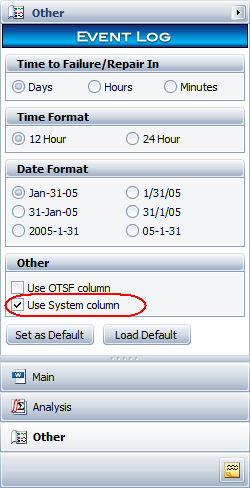
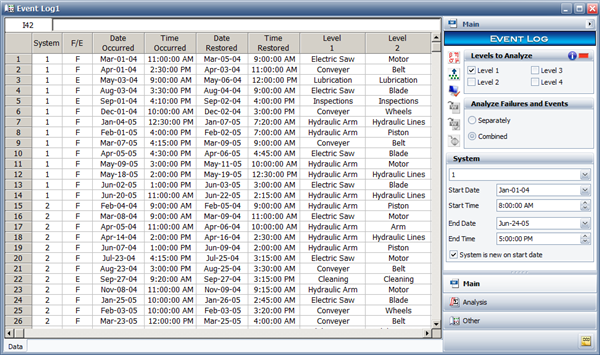
Figure 2: The Main page of the control panel with data shown.
Step 3: On the Main page of the control panel, select 1 from the System drop-down menu. Enter January 1, 2004 for the Start Date and 8 AM for the Start Time. Enter June 24, 2005 for the End Date and 5 PM for the End Time. Make sure that the System is new on start dateoption is selected, as shown in the previous figure, so the system will be considered new at the start of the analysis period.
Step 4: Repeat the previous step for system 2 using the same data.
Step 5: Click the Shift Pattern icon on the control panel and then set the shift pattern, as shown next.
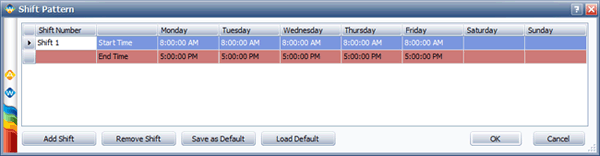
Figure 3: Shift Pattern window with shifts defined.
Step 6: Calculate the failure and repair distributions for the data set, then click anywhere inside the Analysis Summary area to display the results, as shown next.
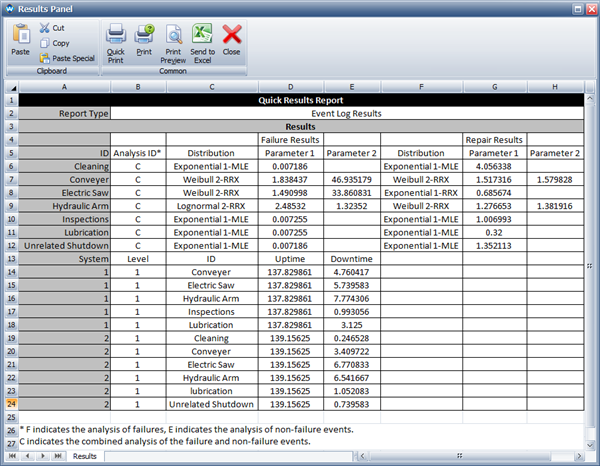
Figure 4: Results of the event log data analysis.



